
Showing posts with label I'll Show You How. Show all posts

12.08.2010

Library Clean Up

Musical standardization really sets my hard drive a-spin. The upside is watching my Play Density neatly propagate itself every Friday afternoon. The downside is shoddy labeling and useless metadata in my library. Nothing gets my goat like seeing an artist listed in my library 5 times because of an alternate spelling or extra space. To that end I've got my Artist, Album, and Genre fields Germanly regularized, along with well established conventions for listing featured artists, associating tracks, and assigning ratings. Until today though the Lyrics field has eluded my teutonical keystrokes due to a combination of its low visibility and relative inaccessibility in iTunes. Today I say, "No to @ThatHustle and no to this kind of crap on my screen." 

So, with a little help from Doug's Applescript site, I've modified some scripts to help me fix my Lyric Problem. And now you can too:
Lyric Playlist.zip
Directions:
1. Care that you have random stuff in your lyrics field.
2. Own an Apple computer.
3. Download file: Lyric Playlist.zip and decompress it.
4. Run file.
  • This will search either your entire music library or a specific playlist, depending on what you have selected in iTunes at the time, and make a new playlist called "Lyricality" containing only those songs with between 1 and 200 characters in their Lyrics field. The 200 character limit should weed out tracks containing legitimate song lyrics.
5. Delete the lyrics info manually from the tracks in Lyricality, or use Doug's handy Delete Lyrics script to delete the lyrics field from selected tracks.

I feel better, do you?

4.23.2010

Handies

Ever since I saw it done for Wisconsin I've been claiming that more states should be represented by hands. Maybe I just haven't met the right people, but Pennsylvania could work really well. And how else is anybody going to know where Altoona is? Then this post from StrangeMaps popped up on my googlereader with a hand job for both peninsulas. Toché 'Ganders, touché.

So, what other states should be making maps with their hands? Here's couple that already are:
Wisconsin: America's Other Mitten

West Virginia: The Panhandle of Love

Alaska: Have you met my island chains?

Texas: Two for T

Maryland: The Chesapeake Claw


Good for them, but why aren't these guys doing it too? 
Pennsylvania: Penn's Smokestack 

Virginia: This Little Pinky Seceded  

Oklahoma: "Indian Territory, Scout's Honor"

Massachusetts: Welcome to Worcester 

Washington: The Massachusetts of the West

Idaho: Canada's Poker

Hawaii: Five-0

It's time we all start to do the Helen Keller and talk with our hands. Especially you Washington State, you've got a great hand-shape. Get with the program. 

9.14.2009

The Continuing Story of Density, Play

If you've been hoping that I was going to stop talking about this Play Density thing sometime soon, skip ahead now. If you've been waiting to hear about the latest developments, I've got just the thing for you!

First up is some new terminology via the brother Evan—The Densitometer, i.e. the tool that measures the densitosity of a song in the burgeoning field of Densitometry. This was the sole useful contribution that came from our lengthy, multi-day email exchange we had on the topic last week. It wasn't worth it.

Next in line, the long awaited playlist function! Finally, a playlist of your Dearest Densest songs. It's like they're just lined up waiting to be played again. This requires a little bit of applescripting; it's like regular scripting, but on a Mac. Don't try it on a PC. Also, don't judge me on my questionable skripting skillz.

Requirements:
1 Macintosh
1 updated Play Density excel document [see previous post for setup instructions]
1 AppleScript application [available below]
1 double click of the mouse


What you'll need to do:
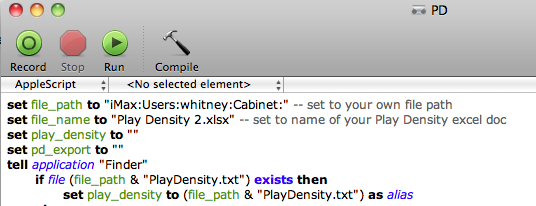
⓵ open that file in your AppleScript Editor
⓶ change the values at the top of the document for file_path and file_name to suite your own computer/file location
file_path is where you keep your Play Density documents in correct "Hard Drive Name:Users:user name:folder name:" format
file_name is the name of your Play Density excel document
PD shot

⓷ choose Save As from the File menu and set File Format to Application
⓸ double click your newly saved application
⓹ wait while Excel gets itself together
⓺ watch as iTunes populates your playlist
⓻ indulge your STOS

7.28.2009

The Kansas Cities, or: How a River Ran Along It.

Kansas Cities

The Kansas Cities have been weighing on my mind ever since we spent some time juggling there earlier this month. Growing up I always assumed the MO and KS versions sat across the Missouri River. That's decidedly incorrect [see map], but I don't feel bad about the misperception. KCMO is on the Missouri after all, and the Missouri is the border between the two states for a significant distance. It's just not the border between the two cities. Neither is the Kansas River. Instead, the border between KCKS and KCMO is delineated by the old 1820 Missouri constitution which set the state's western boundary as  "the meridian line passing through the middle of the mouth of the Kansas River, where the same empties into the Missouri River". It doesn't help that the mouth of the Kansas River moved westward sometime after 1836 when Missouri convinced the Federal Government to give it the land from the Platte Purchase. Conveniently, the Geology Library is just down the street, so I spent some time there this afternoon researching the meanderings of the Kansas River. 

Notably, that little nubbin of land on the east side of the Kansas River is called the West Bottoms and it used to house the Kansas City Stockyards. Now it just houses Whitney photo shoots.

7.23.2009

Play Density 2.0

My PlayDensity habit has slowly been spreading across Southern Wisconsin over the past 7 months. Any day now it's going to jump the shark and go mainstream. Or at least make it to Iowa. Doesn't everybody want to know what their most commonly played songs are‽ I never stop thinking about mine, and yours. I hope that's not kreepy, I'm just curious. With that in mind, I'm ready to release the PlayDensity 2.0 update which has been in public beta testing for the last month.

What began as a simple ratio of (playcount) ÷ (# of days in library) had been updated to exclude songs less than 7 days old by the time Version 1.0 was released. Why 7 days? A song that's played twice in 2 days may not be that special, but one that's played 7 times in 7 days deserves some recognition. So what does v2.0 have to offer? More standardization(!) and a playlist. To account for the increasing variability as the # of Days increases we'll now be taking the logarithmus naturali of each of our variables, and then doing a small correction to convert into percentages.

pd 2.0 = 100(e^(ln(playcount)/ln(# of Days))/100 -1)


Now it's your turn.

⓵ Make a smart playlist with these criteria:
⓶ Export your playlist to a text file.

⓷ Download this Excel sheet:


⓸ Open the Excel sheet. It'll try to read the exported text file, you'll have to tell it where it is the 1st time you open it by editing the text import settings. Once you've chosen your file the other settings should be set already; click through to 'Finish'.


⓹ Select your newly acquired data and sort by descending values of Play Density.


pd
⓺ Show it to me.